
搜索到
3
篇与
的结果
-
 lnmp如何打开mysql远程访问 1、给mysql的数据库账户增加远程访问权限mysql; mysql>use mysql; mysql>grant all privileges on *.* to '账户'@'%或者ip' identified by '密码' with grant option; mysql>flush privileges; # 加载刚刚设置的配置 mysql>exit; #退出mysql lnmp restart # 重启lnmp2、通过iptables修改系统防火墙规则iptables -L -n --line-numbers # 查看已有的iptables规则 # 在iptables规则里有一行是DROP,末尾以3306结尾的,在lnmp1.5里面序号是6,不同版本可能会不一样,自行确认 iptables -D INPUT 6如果删掉drop 3306端口后,还是连接补上,就通过iptables添加上3306端口# 新增规则(-I表示插入在链的第一位置,-A 表示追加到链的末尾位置,防火墙规则是从上往下读取) iptables -I INPUT -p tcp --dport 3306 -j ACCEPT # 保存规则到默认文件/etc/sysconfig/iptables service iptables save # 重启 service iptables restart3、阿里云或者腾讯云,在控制端放开相关端口
 -
lnmp安装好后phpmyadmin无法登陆mysql报错SERVER SENT CHARSET (255) UNKNOWN 报错phpmyadmin报错mysqli_real_connect(): Server sent charset (255) unknown to the client. Please, report to the developers mysqli_real_connect(): (HY000/2054): Server sent charset unknown to the client. Please, report to the developers原因分析这是因为在MySQL 8.0.11中,caching_sha2_password是默认的身份验证插件,而不是以往的mysql_native_password。所以和php不兼容。可以降级php,也可以修改MySQL的配置。修复方式打开/etc/my.cnf做如下配置:[mysqld] port=3306 character-set-server=utf8 default_authentication_plugin=mysql_native_password [mysql] default-character-set=utf8 [client] default-character-set=utf8执行重启命令lnmp restart再到phpMyAdmin登录就可以了。
-
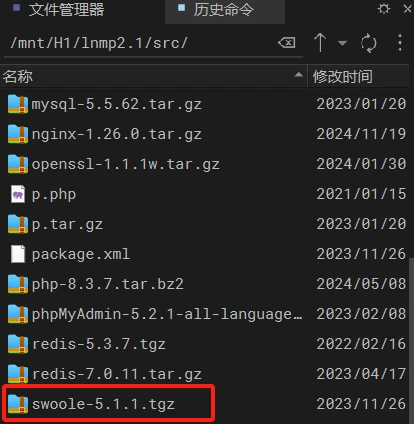
LNMP安装swoole插件出错解决办法 报错内容Connecting to soft.lnmp.com (soft.lnmp.com)|43.159.69.110|:443... connected. HTTP request sent, awaiting response... 404 Not Found 2024-11-19 10:40:42 ERROR 404: Not Found. Uncompress swoole-5.1.1.tgz... tar (child): swoole-5.1.1.tgz: Cannot open: No such file or directory tar (child): Error is not recoverable: exiting now tar: Child returned status 2 tar: Error is not recoverable: exiting now cd swoole-5.1.1... include/main.sh: line 783: cd: swoole-5.1.1: No such file or directory Cannot find config.m4. Make sure that you run '/usr/local/php/bin/phpize' in the top level source directory of the module include/php_swoole.sh: line 22: ./configure: No such file or directory make: *** No targets specified and no makefile found. Stop. /mnt/H1/lnmp2.1/src Restarting php-fpm...... Gracefully shutting down php-fpm . done Starting php-fpm [19-Nov-2024 10:40:43] NOTICE: PHP message: PHP Warning: PHP Startup: Unable to load dynamic library 'swoole.so' (tried: /usr/local/php/lib/php/extensions/no-debug-non-zts-20230831/swoole.so (/usr/local/php/lib/php/extensions/no-debug-non-zts-20230831/swoole.so: cannot open shared object file: No such file or directory), /usr/local/php/lib/php/extensions/no-debug-non-zts-20230831/swoole.so.so (/usr/local/php/lib/php/extensions/no-debug-non-zts-20230831/swoole.so.so: cannot open shared object file: No such file or directory)) in Unknown on line 0 done PHP Swoole install failed!解决办法看情况是找不到 安装包. 那么我们自己上传就好了.下载地址http://pecl.php.net/package/swoole{cloud title="下载链接" type="default" url="http://pecl.php.net/package/swoole" password=""/}找到对应的版本 下载下来 ,上传到 LNMP的SRC目录