
搜索到
598
篇与
的结果
-

-
javascript改变日期格式,js 前言在web开发中,我们常常需要改变日期格式,如将yyyy-MM-dd格式的日期转化为dd/MM/yyyy格式,或者将日期转化为时间戳。在这篇文章中,我们将会介绍如何使用JavaScript改变日期格式。一:将日期转化为时间戳时间戳是指自1970年1月1日00:00:00 UTC以来的毫秒数,它常用于记录时间和日期分布。在JavaScript中,我们可以使用Date对象的getTime()方法获取当前日期的时间戳:var timestamp = new Date().getTime(); console.log(timestamp);上述代码会输出当前的时间戳。二、将日期转化为指定格式在JavaScript中,我们可以使用Date对象的方法将日期格式化成指定的字符串格式。下面列出了一些常用的日期格式:yyyy-MM-dd:年-月-日MM/dd/yyyy:月/日/年dd-MM-yyyy:日/月/年yyyy-MM-dd HH:mm:ss:年-月-日 时:分:秒yyyyMMddHHmmss:年月日时分秒下面是使用JavaScript将日期转化为指定格式的示例代码:// 将日期格式化为yyyy-MM-dd格式 function formatDate(date) { var year = date.getFullYear(); var month = date.getMonth() + 1; var day = date.getDate(); if (month < 10) month = "0" + month; if (day < 10) day = "0" + day; return year + "-" + month + "-" + day; } var date = new Date(); console.log(formatDate(date)); //2022-02-22 // 将日期格式化为MM/dd/yyyy格式 function formatDate2(date) { var year = date.getFullYear(); var month = date.getMonth() + 1; var day = date.getDate(); if (month < 10) month = "0" + month; if (day < 10) day = "0" + day; return month + "/" + day + "/" + year; } console.log(formatDate2(date)); //02/22/2022 // 将日期格式化为dd-MM-yyyy格式 function formatDate3(date) { var year = date.getFullYear(); var month = date.getMonth() + 1; var day = date.getDate(); if (month < 10) month = "0" + month; if (day < 10) day = "0" + day; return day + "-" + month + "-" + year; } console.log(formatDate3(date)); //22-02-2022 // 将日期格式化为yyyy-MM-dd HH:mm:ss格式 function formatDate4(date) { var year = date.getFullYear(); var month = date.getMonth() + 1; var day = date.getDate(); var hour = date.getHours(); var minute = date.getMinutes(); var second = date.getSeconds(); if (month < 10) month = "0" + month; if (day < 10) day = "0" + day; if (hour < 10) hour = "0" + hour; if (minute < 10) minute = "0" + minute; if (second < 10) second = "0" + second; return year + "-" + month + "-" + day + " " + hour + ":" + minute + ":" + second; } console.log(formatDate4(date)); //2022-02-22 00:00:00 // 将日期格式化为yyyyMMddHHmmss格式 function formatDate5(date) { var year = date.getFullYear(); var month = date.getMonth() + 1; var day = date.getDate(); var hour = date.getHours(); var minute = date.getMinutes(); var second = date.getSeconds(); if (month < 10) month = "0" + month; if (day < 10) day = "0" + day; if (hour < 10) hour = "0" + hour; if (minute < 10) minute = "0" + minute; if (second < 10) second = "0" + second; return "" + year + month + day + hour + minute + second; } console.log(formatDate5(date)); //20220222000000使用上述代码,我们可以方便地将日期转化为指定格式。总结:在web开发中,JavaScript常常被用来改变日期格式。本文介绍了如何将日期转化为时间戳以及将日期转化为指定的日期格式,希望可以帮助读者更好地理解JavaScript的日期处理。
-
MySQL、MariaDB字段批量更新:设置大于、小于、等于某个值自动更新 字段内容大于10的自动-1语法如下:update <数据表> set <字段名称>=<更新方法> where <匹配条件>;假设我的数据信息如下:名称内容数据表sum字段名称permit那么我的语句就是:update sum set permit=permit+1 where permit=10;其中:permit=10就是匹配条件,可以根据实际需求更改,例如:permit=5permit<8permit>10permit!=0更多需求就可以根据这个思路去扩展了实践结果大于10的自动+1举列:update POSTS set VISITS=floor(random()*9999) where VISITS<500;
-
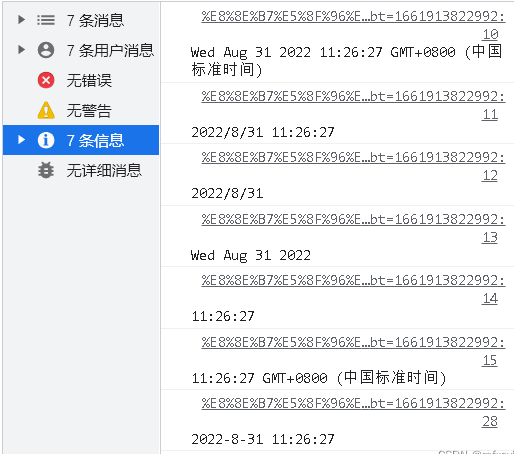
javascript,js获取当前时间 获取时间在js中,可以使用new Date( )来获取当前的时间let time = new Date() console.log(time) //打印结果为:Wed Aug 31 2022 10:47:48 GMT+0800 (中国标准时间) console.log(time.toLocaleString()) //打印结果为:2022/8/31 10:49:41 console.log(time.toLocaleDateString()) //打印结果为:2022/8/31 console.log(time.toDateString()) //打印结果为:Wed Aug 31 2022 console.log(time.toLocaleTimeString()) //打印结果为:10:53:04 console.log(time.toTimeString()) //打印结果为:10:54:25 GMT+0800 (中国标准时间)日期格式化如果有一个需求,需要将当前日期格式化为yyyy-MM-dd hh:mm:ssfunction timestampToTime(times) { let time = times[1] let mdy = times[0] mdy = mdy.split('/') let month = parseInt(mdy[0]); let day = parseInt(mdy[1]); let year = parseInt(mdy[2]) return year + '-' + month + '-' + day + ' ' + time } let time = new Date() let nowTime = timestampToTime(time.toLocaleString('en-US',{hour12: false}).split(" ")) console.log(nowTime) //打印结果为:2022-8-31 11:08:34
-
JavaScript获取当前时间向前推三个月的方法示例 获取当前时间向前推三个月可以使用JavaScript中的Date对象和相关方法来实现。下面是具体的攻略:1. 获取当前时间使用JavaScript中的Date对象可以获取当前的时间。代码如下:var currentTime = new Date(); console.log(currentTime);输出结果如下:Sun Jul 11 2021 15:40:14 GMT+0800 (中国标准时间)可以看到,获取到的是当前的时间信息,包括年、月、日、时、分、秒以及时区等信息。2. 获取当前时间向前推三个月的时间获取当前时间向前推三个月的时间,需要先获取当前时间,再进行月份上的计算,并将结果保存到一个新的Date对象中。代码如下:var currentTime = new Date(); var threeMonthsAgo = new Date(currentTime.setMonth(currentTime.getMonth()-3)); console.log(threeMonthsAgo);输出结果如下:Sat Apr 11 2021 15:42:33 GMT+0800 (中国标准时间)可以看到,获取到的是当前时间向前推三个月的时间信息。
-
vue或JavaScript中日期无法转时间戳问题;例:2023年02月03日 16时30分 Vue或JavaScript中日期无法转时间戳问题;例:2023年02月03日 16时30分,因为new Date();必须要求2023-02-03 16:30 的日期格式所以我们就要过滤或者替换掉中文var fireStartTime = "2023年02月03日 16时30分"; fireStartTime = fireStartTime.replace("年","-"); fireStartTime = fireStartTime.replace("月","-") fireStartTime = fireStartTime.replace("日","") console.log(fireStartTime) // 2023-02-03 16时30分
-
-
Sideloadly安裝IPA文件-iOS免费签名教程 前言前不久为了安装一个只能自签使用的app,无奈下载了sideloadly,不要问为啥不用爱思或者牛蛙,问就是软件限制。安装软件顺便记录下,写个教程。01▎Sideloadly使用准备Windows或mac电脑02▎Sideloadly介绍使用免费或付费AppleID侧载APP的工具支持注入插件。支持 iOS 7 到 iOS 16.2+设备。支持覆盖安装。支持WiFi侧载安装。支持有2次验证的AppleID。03▎安装注意事项官网地址:https://sideloadly.io/开始使用手机连上电脑,或者与电脑连同一WIFI识别手机之后,输入AppleID拖入ipa文件点击start,弹出输入密码开始安装,如果是游戏的话,注入插件可以选择Advanced Options安装到手机上之后,选择打开会出现让信任开发者,在设置->通用->VPN与设备管理中,选择对应AppleID账号,进行信任。之后就能正常打开使用了。