
搜索到
90
篇与
的结果
-
 wps2019版(功能大全版) WPS2019虽然属于老版但是多数会员功能都能用下载地址{cloud title="https://pan.baidu.com/s/17NqrI4o9YL9zrovF0ctbvw" type="default" url="百度网盘1" password=""/}{cloud title="https://pan.baidu.com/s/1kMyr9RPRX7NxGGWaephiCw?pwd=845v" type="default" url="百度网盘2" password=""/}{cloud title="https://www.alipan.com/s/2LJykL71mHq" type="default" url="阿里云盘" password=""/}{cloud title="https://cloud.189.cn/web/share?code=E3mUrqfeIZZb" type="default" url="天翼云盘" password=""/}
 -
【openvpn系列二】解决OpenVPN客户端所有网络全走V*P*N的问题 问题的根源VPN客户端每次连接,都会从服务器拉取一些特定配置,这些配置是在服务器端配置文件中 push 指令指定的。例如默认的配置文件 /etc/openvpn/server.conf:port 1194 proto tcp dev tun user nobody group nobody persist-key persist-tun keepalive 10 120 topology subnet server 10.8.0.0 255.255.255.0 ifconfig-pool-persist ipp.txt push "dhcp-option DNS 202.98.198.167" push "dhcp-option DNS 202.98.192.67" push "redirect-gateway def1 bypass-dhcp" dh none ecdh-curve prime256v1 tls-crypt tls-crypt.key crl-verify crl.pem ca ca.crt cert server_JBGqk83QfIA9DMUA.crt key server_JBGqk83QfIA9DMUA.key auth SHA256 cipher AES-128-GCM ncp-ciphers AES-128-GCM tls-server tls-version-min 1.2 tls-cipher TLS-ECDHE-ECDSA-WITH-AES-128-GCM-SHA256 client-config-dir /etc/openvpn/ccd status /var/log/openvpn/status.log verb 3如上面,会将这三条配置推到客户端,也就是客户端连接后拉取的配置:push "dhcp-option DNS 202.98.198.167" push "dhcp-option DNS 202.98.192.67" push "redirect-gateway def1 bypass-dhcp"重点是第三条,会让客户端所有网络流量重定向到VPN,也就是全走VPN隧道,这怎么可以?服务器本来带宽就不咋地,这么一整,一些看片的人岂不是把服务器挤爆了。必须要治~~~解决办法第一种办法就是在客户端下药在客户端配置文件中加入如下配置:第一种办法就是在客户端下药 在客户端配置文件中加入如下配置:第一条命令就是禁止从服务器拉取配置(你不是本事大么,每次连接都从服务器拉取配置,我给你禁掉,看你咋整),第二条命令就是指定一条路由规则,代表192.168网段的所有流量走VPN隧道,其他流量走正常的网络渠道,达到目的。[blockquote2 name='洛维花']这里普及一下,vpn_gateway 表示默认访问网络不走vpn隧道,指定了该参数的路由才会自动进入VPN隧道。与之相对应的是 net_gateway,表示默认所有流量都走VPN隧道,指定了该参数的路由才会走正常的网络渠道。同时,默认只允许添加100条路由,可以通过 max-routes 2000 指令指定更大的(这里2000)路由数。[/tip]第二种办法就是在服务端下药你服务端不是每次都推路由配置嘛,那就把服务端配置文件中推的内容改掉,直接治本。将上面提到的 push 配置注释掉,自己添加:;这个分号就表示注释 ;push "dhcp-option DNS 202.98.198.167" ;push "dhcp-option DNS 202.98.192.67" ;push "redirect-gateway def1 bypass-dhcp" push "route 192.168.1.0 255.255.255.0 vpn_gateway"给客户端推一条路由配置不就问题解决了,当然这里你也可以推送多条。[blockquote2 name='洛维花']这里我建议使用第二种做法,只修改一次,客户端配置不用动,当然具体问题具体分析,根据自己的实际情况权衡利弊。[/tip]可能遇到的问题修改完服务端的配置就需要重启服务,你可能不知道服务名叫啥。其实它叫:openvpn@server,是不是感觉有点怪?不按套路出牌。实则这是个动态service,挺牛逼,感兴趣的可以去了解一下。当你发现 systemctl status openvpn@server 服务时挂掉的状态时,其实此刻openvpn的进程还在跑着,这时候,你就要杀掉它:pkill openvpn,然后再 systemctl restart openvpn@server,这样服务就被重启了,同时配置文件也会加载为最新的。服务端和客户端配置文件详解文章最后附上配置文件的配置项解读。服务端配置################################################# # 多客户端服务器的OpenVPN 2.0配置文件示例 # # # # 本文件用于多客户端<->单服务器端的 # # OpenVPN服务器端配置 # # # # OpenVPN也支持单机<->单机的配置 # # (在网站上的示例页面更多信息) # # # # 这个配置可以在Windows或Linux/BSD系统上工作。 # # Windows的路径名需要加双引号并使用双反斜杠,如: # # "C:\\Program Files\\OpenVPN\\config\\foo.key" # # # # 前面加'#'或';'的是注释 # ################################################# # OpenVPN应该监听哪个本地IP地址(可选) # 如果不设置,默认监听所有IP ;local a.b.c.d # OpenVPN应该监听哪个端口(TCP/UDP) # 如果想在同一台计算机上运行多个OpenVPN实例,可以使用不同的端口号来区分它们 # 在防火墙上打开这个端口 port 1194 # 服务器使用TCP还是UDP协议 ;proto tcp proto udp # 指定OpenVPN创建的通信隧道类型 # "dev tun"将会创建一个路由IP隧道 # "dev tap"将会创建一个以太网隧道 # 如果是以太网桥接模式,并且提前创建了一个名为"tap0"的与以太网接口进行桥接的虚拟接口,则你可以使用"dev tap0" # 如果想控制VPN的访问策略,必须为TUN/TAP接口创建防火墙规则 # 在非Windows系统中,可以给出明确的单位编号,如"tun0" # 在Windows中,也可以使用"dev-node" # 在大多数系统上,除非部分或完全禁用了TUN/TAP接口的防火墙,否则VPN将不起作用。 ;dev tap dev tun # 如果想配置多个隧道,需要用到网络连接面板中TAP-Win32适配器的名称(如"MyTap") # 在XP SP2或更高版本的系统中,可能需要有选择地禁用掉针对TAP适配器的防火墙 # 通常情况下,非Windows系统则不需要该指令。 ;dev-node MyTap # 设置SSL/TLS根证书(ca)、证书(cert)和私钥(key)。 # 每个客户端和服务器端都需要它们各自的证书和私钥文件。 # 服务器端和所有的客户端都将使用相同的CA证书文件。 # # 通过easy-rsa目录下的一系列脚本可以生成所需的证书和私钥。 # 服务器端和每个客户端的证书必须使用唯一的Common Name。 # # 也可以使用遵循X509标准的任何密钥管理系统来生成证书和私钥。 # OpenVPN也支持使用一个PKCS #12格式的密钥文件(详情查看站点手册页面的"pkcs12"指令) ca ca.crt cert server.crt key server.key # 该文件应该保密 # 迪菲·赫尔曼参数 # 使用如下命令生成: # openssl dhparam -out dh2048.pem 2048 dh dh2048.pem # 网络拓扑结构 # 应该为子网(通过IP寻址) # 除非必须支持Windows客户端v2.0.9及更低版本(net30即每个客户端/30) # 默认为"net30"(不建议) ;topology subnet # 设置服务器端模式,并提供一个VPN子网,以从中为客户端分配IP地址 # 本例中服务器端自身占用10.8.0.1,其他的将分配给客户端使用 # 每个客户端将能够通过10.8.0.1访问服务器 # 如果使用的是以太网桥接模式,注释掉本行。更多信息请查看官方手册页面。 server 10.8.0.0 255.255.255.0 # 在此文件中维护客户端与虚拟IP地址之间的关联记录 # 如果OpenVPN重启,重新连接的客户端可以被分配到先前分配的虚拟IP地址 ifconfig-pool-persist ipp.txt # 该指令仅针对以太网桥接模式 # 首先,必须使用操作系统的桥接能力将以太网网卡接口和TAP接口进行桥接 # 然后,需要手动设置桥接接口的IP地址、子网掩码,这里假设为10.8.0.4和255.255.255.0 # 最后,必须指定子网的一个IP范围(例如从10.8.0.50开始,到10.8.0.100结束),以便于分配给连接的客户端 # 如果不是以太网桥接模式,直接注释掉这行指令即可 ;server-bridge 10.8.0.4 255.255.255.0 10.8.0.50 10.8.0.100 # 该指令仅针对使用DHCP代理的以太网桥接模式 # 此时客户端将请求服务器端的DHCP服务器,从而获得分配给它的IP地址和DNS服务器地址 # 在此之前,也需要先将以太网网卡接口和TAP接口进行桥接 # 注意:该指令仅用于OpenVPN客户端(如Windows),并且该客户端的TAP适配器需要绑定到一个DHCP客户端上 ;server-bridge # 推送路由信息到客户端,以允许客户端能够连接到服务器后的其他私有子网 # 即允许客户端访问VPN服务器可访问的其他局域网 # 记住,这些私有子网还需要将OpenVPN客户端地址池(10.8.0.0/255.255.255.0)路由回到OpenVPN服务器 ;push "route 192.168.10.0 255.255.255.0" ;push "route 192.168.20.0 255.255.255.0" # 要为指定的客户端分配特定的IP地址,或者客户端后的私有子网也要访问VPN # 可以针对该客户端的配置文件使用ccd子目录 # 请参阅手册页获取更多信息 # 示例1:假设有个Common Name为"Thelonious"的客户端后有一个小型子网也要连接到VPN # 该子网为192.168.40.128/255.255.255.248 # 首先,去掉下面两行指令的注释: ;client-config-dir ccd ;route 192.168.40.128 255.255.255.248 # 然后创建一个文件ccd/Thelonious,该文件的内容为(没有"#"): # iroute 192.168.40.128 255.255.255.248 # 客户端所在的子网就可以访问VPN了 # 注意,这个指令只能在基于路由模式而不是基于桥接模式下才能生效 # 比如,你使用了"dev tun"和"server"指令 # 示例1:假设要给Thelonious分配一个固定的IP地址10.9.0.1 # 首先,去掉下面两行指令的注释: ;client-config-dir ccd ;route 10.9.0.0 255.255.255.252 # 然后在文件ccd/Thelonious中添加如下指令(没有"#"): # ifconfig-push 10.9.0.1 10.9.0.2 # 如果想要为不同群组的客户端启用不同的防火墙访问策略,你可以使用如下两种方法: # (1)运行多个OpenVPN守护进程,每个进程对应一个群组,并为每个进程(群组)启用适当的防火墙规则 # (2)(进阶)创建一个脚本来动态地修改响应于来自不同客户的防火墙规则 # 关于learn-address脚本的更多信息请参考官方手册页面 ;learn-address ./script # 如果启用该行指令,所有客户端的默认网关都将重定向到VPN # 这将导致诸如web浏览器、DNS查询等所有客户端流量都经过VPN # (为确保能正常工作,OpenVPN服务器所在计算机可能需要在TUN/TAP接口与以太网之间使用NAT或桥接技术进行连接) ;push "redirect-gateway def1 bypass-dhcp" # 某些具体的Windows网络设置可以被推送到客户端,例如DNS或WINS服务器地址 # 下列地址来自opendns.com提供的Public DNS服务器 ;push "dhcp-option DNS 208.67.222.222" ;push "dhcp-option DNS 208.67.220.220" # 去掉该行指令的注释将允许不同的客户端之间互相访问 # 默认情况,客户端只能访问服务器 # 为了确保客户端只能看见服务器,还可以在服务器端的TUN/TAP接口上设置适当的防火墙规则 ;client-to-client # 如果多个客户端可能使用相同的证书/私钥文件或Common Name进行连接,那么可以取消该指令的注释 # 建议该指令仅用于测试目的。对于生产环境使用而言,每个客户端都应该拥有自己的证书和私钥 # 如果没有为每个客户端分别生成Common Name唯一的证书/私钥,可以取消该行的注释(不推荐这样做) ;duplicate-cn # keepalive指令将导致类似于ping命令的消息被来回发送,以便于服务器端和客户端知道对方何时被关闭 # 每10秒钟ping一次,如果120秒内都没有收到对方的回复,则表示远程连接已经关闭 keepalive 10 120 # 出于SSL/TLS之外更多的安全考虑,创建一个"HMAC 防火墙"可以帮助抵御DoS攻击和UDP端口淹没攻击 # 可以使用以下命令来生成: # openvpn --genkey --secret ta.key # # 服务器和每个客户端都需要拥有该密钥的一个拷贝 # 第二个参数在服务器端应该为'0',在客户端应该为'1' tls-auth ta.key 0 # 该文件应该保密 # 选择一个密码加密算法,该配置项也必须复制到每个客户端配置文件中 # 注意,v2.4客户端/服务器将自动以TLS模式协商AES-256-GCM,请参阅手册中的ncp-cipher选项 cipher AES-256-CBC # 在VPN链接上启用压缩并将选项推送到客户端(仅适用于v2.4 +,对于早期版本,请参阅下文) ;compress lz4-v2 ;push "compress lz4-v2" # 对于与旧客户端兼容的压缩,使用comp-lzo # 如果在此启用,还必须在客户端配置文件中启用它 ;comp-lzo # 允许并发连接的客户端的最大数量 ;max-clients 100 # 初始化后减少OpenVPN守护进程的权限是一个好主意 # 该指令仅限于非Windows系统中使用 ;user nobody ;group nobody # 持久化选项可以尽量避免访问那些在重启之后由于用户权限降低而无法访问的某些资源 persist-key persist-tun # 输出一个简短的状态文件,用于显示当前的连接状态,该文件每分钟都会清空并重写一次 status openvpn-status.log # 默认情况下,日志消息将写入syslog(在Windows系统中,如果以服务方式运行,日志消息将写入OpenVPN安装目录的log文件夹中) # 可以使用log或者log-append来改变这种默认设置 # "log"方式在每次启动时都会清空之前的日志文件 # "log-append"是在之前的日志内容后进行追加 # 你可以使用两种方式之一(不要同时使用) ;log openvpn.log ;log-append openvpn.log # 为日志文件设置适当的冗余级别(0~9) # 冗余级别越高,输出的信息越详细 # # 0 表示静默运行,只记录致命错误 # 4 表示合理的常规用法 # 5和6 可以帮助调试连接错误 # 9 表示极度冗余,输出非常详细的日志信息 verb 3 # 忽略过多的重复信息 # 相同类别的信息只有前20条会输出到日志文件中 ;mute 20 # 通知客户端,当服务器重新启动时,可以自动重新连接 # 只能是UDP协议使用,TCP使用的话不能启动服务 explicit-exit-notify 1 # (如果不添加该指令则)默认值3600,也就是一个小时进行一次TSL重新协商 # 这个参数在服务端和客户端设置都有效 # 如果两边都设置了,就按照时间短的设定优先 # 当两边同时设置成0,表示禁用TSL重协商。使用OTP认证需要禁用 reneg-sec 0客户端配置############################################## # 多客户端的OpenVPN 2.0的客户端配置文件示例 # # # # 该配置文件可以被多个客户端使用 # # 不过每个客户端都应该有自己的证书和密钥文件 # # # # 在Windows上此配置文件的后缀应该是".ovpn" # # 在Linux/BSD系统中后缀是".conf" # ############################################## # 指定这是一个客户端,这将从服务器获取某些配置文件指令 client # 使用与服务器上相同的设置 # 在大多数系统中,除非部分禁用或者完全禁用了TUN/TAP接口的防火墙,否则VPN将不起作用 ;dev tap dev tun # 在Windows系统中,如果想配置多个隧道,则需要该指令 # 需要用到网络连接面板中TAP-Win32适配器的名称(例如"MyTap") # 在XP SP2或更高版本的系统中,可能需要禁用掉针对TAP适配器的防火墙 ;dev-node MyTap # 指定连接的服务器是采用TCP还是UDP协议 # 使用与服务器上相同的设置 ;proto tcp proto udp # 指定服务器的主机名(或IP)以及端口号 # 如果有多个VPN服务器,为了实现负载均衡,可以设置多个remote指令 remote my-server-1 1194 ;remote my-server-2 1194 # 如果指定了多个remote指令,启用该指令将随机连接其中的一台服务器 # 否则,客户端将按照指定的先后顺序依次尝试连接服务器 ;remote-random # 启用该指令,与服务器连接中断后将自动重新连接, # 这在网络不稳定的情况下(例如:笔记本电脑无线网络)非常有用 resolv-retry infinite # 大多数客户端不需要绑定本机特定的端口号 nobind # 在初始化完毕后,降低OpenVPN的权限(该指令仅限于非Windows系统中使用) ;user nobody ;group nobody # 持久化选项可以尽量避免访问在重启时由于用户权限降低而无法访问的某些资源 persist-key persist-tun # 如果通过HTTP代理方式来连接到实际的VPN服务器 # 在此处指定代理服务器的主机名(或IP)和端口号 # 如果代理服务器需要身份认证,请参考官方手册 ;http-proxy-retry # 连接失败时自动重试 ;http-proxy [proxy server] [proxy port #] # 无线网络通常会产生大量的重复数据包 # 设置此标识将忽略掉重复数据包的警告信息 ;mute-replay-warnings # SSL/TLS参数配置 # 更多描述信息请参考服务器端配置文件 # 最好为每个客户端单独分配.crt/.key文件对 # 单个CA证书可以供所有客户端使用 ca ca.crt cert client.crt key client.key # 通过检查证书具有正确的密钥使用设置来验证服务器证书 # 这是防止此处讨论的潜在攻击的重要预防措施: # http://openvpn.net/howto.html#mitm # # 要使用此功能,EasyRSA生成服务器证书的时候进行相关设置 remote-cert-tls server # 如果在服务器上使用tls-auth密钥,那么每个客户端也必须拥有密钥 tls-auth ta.key 1 # 选择一个加密算法,服务器使用的算法选项,也必须在这里指定它 # 注意,v2.4客户端/服务器将自动以TLS模式协商AES-256-GCM。 # 另请参阅手册中的ncp-cipher选项 cipher AES-256-CBC # 在VPN连接中启用压缩 # 除非在服务器配置文件中启用,否则不要启用它 ;comp-lzo # 设置日志文件冗余级别(0~9) # 0 表示静默运行,只记录致命错误 # 4 表示合理的常规用法 # 5和6 可以帮助调试连接错误 # 9 表示极度冗余,输出非常详细的日志信息 verb 3 # 忽略过多的重复信息 # 相同类别的信息只有前20条会输出到日志文件中 ;mute 20 # (如果不添加该指令则)默认值3600,也就是一个小时进行一次TSL重新协商 # 这个参数在服务端和客户端设置都有效 # 如果两边都设置了,就按照时间短的设定优先 # 当两边同时设置成0,表示禁用TSL重协商。使用OTP认证需要禁用 reneg-sec 0
-
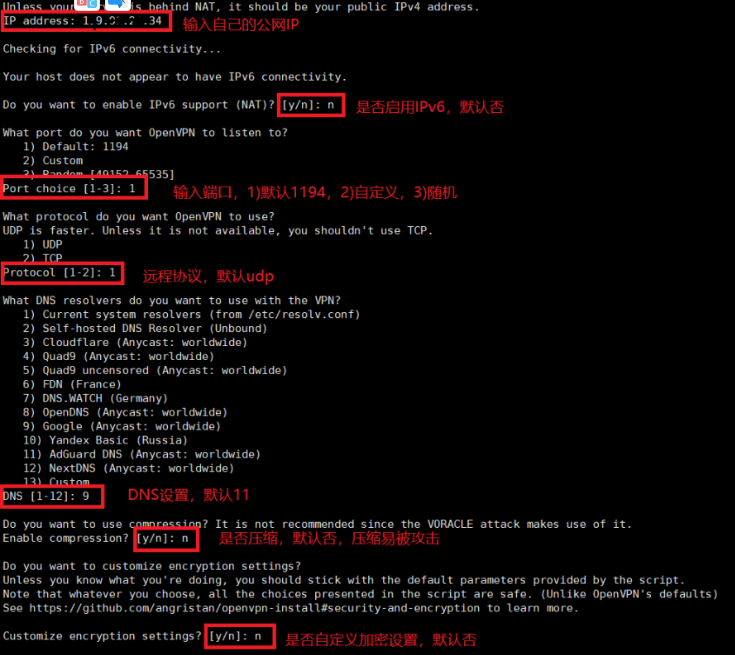
【openvpn系列一】安装并设置openvpn,设置OpenVPN访问公司内网,图文详细 简介当在外办公时,有些服务器需要公司内网才可以访问,所以这时候可以设置openVPN连接访问公司内网服务器。openVPN 手工搭建,设置非常复锁,本人手工设置一次,不想设置第二次。所以可以采用脚本快速搭建访问公司内网,以下推荐两个脚本,都是github使用比较多且正规的脚本,个人推荐第二个脚本,设置选项更多(如连接加密)。github脚本下载地址1:https://github.com/Nyr/openvpn-installgithub脚本下载地址2:https://github.com/angristan/openvpn-install下载安装简单方便,一句命令即可安装,根据提示选择即可:#下载 curl -O https://raw.githubusercontent.com/angristan/openvpn-install/master/openvpn-install.sh #添加执行权限 chmod +x openvpn-install.sh #执行脚本 ./openvpn-install.sh或者直接用git clone,获取整个包,然后进入文件夹执行脚本即可:#下载 git clone git@github.com:angristan/openvpn-install.git #执行脚本 bash openvpn-install/openvpn-install.sh相关选项,自己选择即可完成后,最后设置添加用户,添加完成后,请自行下载连接文件至电脑中。我这里xshell直接用sz命令下载的,有些远程ssh工具不支持sz命令。安装完安装完成,再次运行脚本,可选择 1)添加用户 2)移除已存在的用户 3)协助软件 4)退出客户端连接下载地址:官方客户端下载官方客户端 https://openvpn.net/vpn-client/安装完成后,导入文件开始连接,查看IP地址连接成功!!!注意的坑:根据自己服务器商,有些有默认的防火墙,需要自己添加1194端口,或者自己设置的端口。如腾讯云需要添加防火墙。否则连接失败。
-
在线脱壳ios ipa工具网站.Decrypt IPA Store Decrypt IPA Store是什么Decrypt IPA Store是一个免费在线砸壳IPA工具网站,免费提供苹果iOS的ipa软件在线砸壳服务,直接搜索软件名字、app id或者app的AppStore链接都可以找到需要砸壳的资源,这类砸壳应用需要自行签名的,感兴趣的可以到网站看看。什么是砸壳顾名思义, 就是对软件加壳的逆操作, 把软件上存在的壳去掉. 要想破解别人的App,第一步就是拿到ipa包进行砸壳,砸壳也称作软件脱壳,顾名思义,就是对软件加壳的逆操作,把软件上存在的壳去掉(即解密)。在线砸壳IPA工具网站地址Decrypt IPA Store:https://decrypt.day/
-
小翼管家获取电信光猫超密教程 方法一:苹果手机(最简单)苹果手机在App Store下载抓包软件stream,及小翼管家(绑定光猫)。连接光猫WiFistream软件打开HTTMS抓包,安装CA证书并信任点击开始抓包,打开小翼管家,点击网关设置,然后随便点击(比如指示灯,不点也可以)。回到stream,停止抓包。点击抓包历史。全部请求找到任意一个含有token=的POST网址并点击进去(不行就多试几个POST网址),点击右上角向上的箭头,弹出更多操作,点击编辑重放请求。点击最下面的请求体最下面一行,点击原始数据,删除清空并粘贴以下代码并点击存储:(注意格式){ "Params": [], "MethodName": "GetTAPasswd", "RPCMethod": "CallMethod", "ObjectPath": "/com/ctc/igd1/Telecom/System", "InterfaceName": "com.ctc.igd1.SysCmd", "ServiceName": "com.ctc.igd1" } 最后点击右上角开始按钮,点击响应最下面的BODY即可看到(如果结果返回错误,原因是以上的代码格式不正确或者是POST网址没找对)[blockquote2 name='洛维花']注:密码格式:telecomadmin12345678,账号默认是telecomadmin。[/tip]方法二:安卓手机(麻烦,不同安卓版本运行不同,有的需要ROOT)下载小黄鸟软件httpcanary(最后找到的老版本才成功),并安装根证书(麻烦),我的手机提示“安装根证书抓取SSL数据包”,不用理会。这一步做好之后,以下就简单了。小翼管家(绑定光猫)。连接光猫WiFi。点击开始抓包,打开小翼管家,点击网关设置,然后随便点击(比如指示灯,不点也可以)。回到小黄鸟,找到任意一个含有token=的POST网址并长按(不行就多试几个POST网址),弹出窗口点击编辑重发,点击最下面Body,大小多少B的位置,弹出窗口,点击在线编辑,同样删除清空并粘贴以下代码并点击√:(注意格式){ "Params": [], "MethodName": "GetTAPasswd", "RPCMethod": "CallMethod", "ObjectPath": "/com/ctc/igd1/Telecom/System", "InterfaceName": "com.ctc.igd1.SysCmd", "ServiceName": "com.ctc.igd1" }最后点击右上角开始按钮,会自动返回,然后找到刚刚请求网址,点击响应,点击右下角预览即可看到(如果结果返回错误,原因是以上的代码格式不正确或者是POST网址没找对)[blockquote2 name='洛维花']注:密码格式:telecomadmin12345678,账号默认是telecomadmin。[/tip]
-
-
-
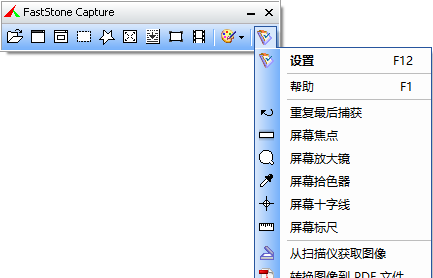
FastStone Capture (屏幕截图) v10.2 汉化版 介绍FastStone Capture 是一款出色的屏幕捕捉(截图)软件,它集图像捕捉,浏览,编辑,视频录制等功能于一身,功能完善,使用方便,值得推荐!软件提供多种捕捉方式(如:活动窗口,指定窗口/对象,矩形区域,手绘区域,整个屏幕,滚动窗口等),提供屏幕录像机,放大镜,拾取颜色,标尺等辅助功能,支持快捷键操作。FastStone Capture 主要功能包括截图功能(可以捕捉:活动窗口、窗口/对象、矩形区域、手绘区域、整个屏幕、滚动窗口、固定区域);图像的处理功能(可以裁切,标记,添加个性化边缘外框等);屏幕录像器(输出格式为 WMV);附带功能包括:屏幕放大器;屏幕取色器;屏幕标尺;将图像转换为 PDF 文件;发送到 PowerPoint,Word,FTP;修改说明@th_sjy汉化@果核剥壳便携制作下载地址{cloud title="123网盘" type="default" url="https://www.123pan.com/s/HQeA-2I4Sh" password=""/}{cloud title="夸克网盘" type="quark" url="https://pan.quark.cn/s/4e61df4ac250" password=""/}{cloud title="下载链接" type="bd" url="https://pan.baidu.com/s/1slOEE2x" password=""/}备用下载地址:{cloud title="下载链接" type="default" url="https://www.123pan.com/s/0ztiVv-Qx9od.html" password=""/}{cloud title="123网盘" type="default" url="https://www.123pan.com/s/0ztiVv-Qx9od.html" password=""/}